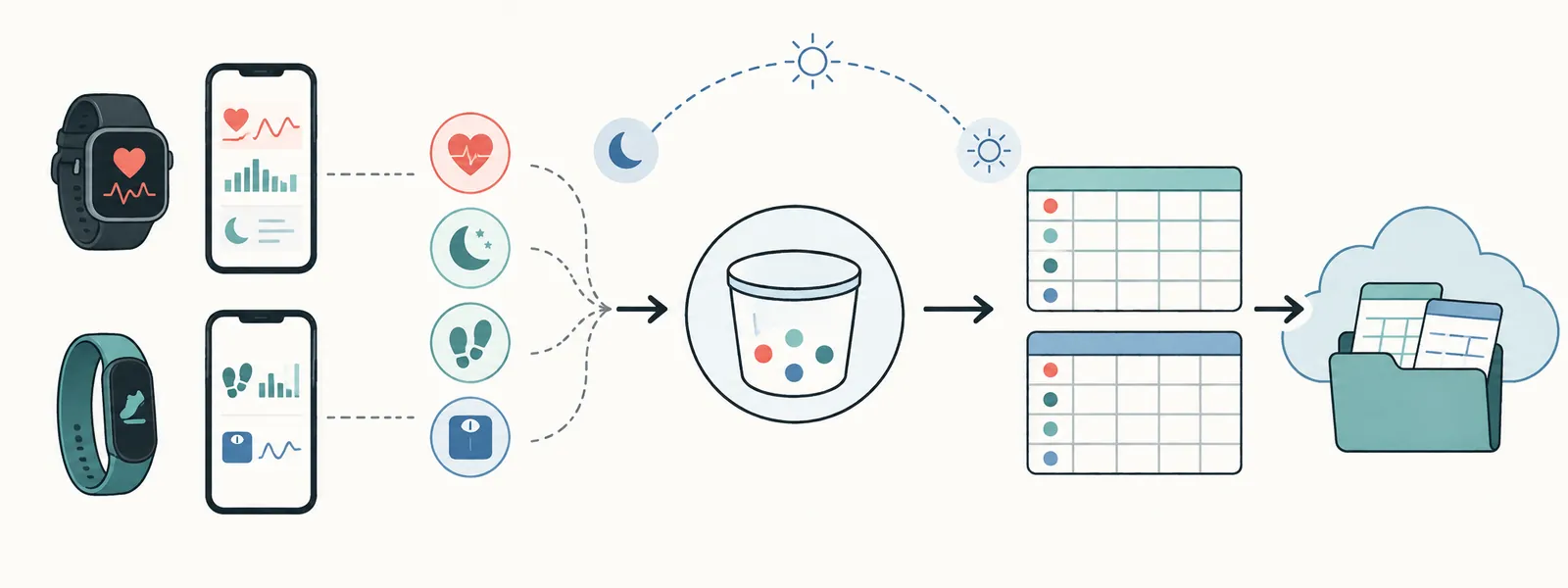
Two people in my household wear Samsung devices and use Samsung Health. Its dashboard is fine for a quick glance, but it doesn’t give you a portable, queryable, long-term record, and it can’t show trends across months or years, or across two people at once.
This is the Android app I built to fix that. It reads everything Health Connect exposes, aggregates it sensibly, and appends it to a per-person CSV file in Google Drive. No backend server, no third-party service, just the phone and a Drive folder.
The source is open: espaillato/HealthSync. The sections below are the design decisions and bugs behind it.
- Why this exists: source data for something else
- Why Health Connect, not Samsung Health directly
- Architecture
- Data model: daily aggregation and the sleep-day problem
- Google Drive as the sync target (service account gotchas)
- The WorkManager scheduling bug that cost a day
- Dedup, cursors, and retroactive permission grants
- Android 14’s second permission-rationale requirement
- Running it on two sideloaded phones
- Blood pressure: a hardware limit, a Health Connect wall, and a manual import path
- Running it yourself
- End state
0. Why this exists: source data for something else
Fair question: why build this instead of glancing at the Samsung Health app now and then? The data is source material for something else.
I keep a structured personal document archive organized around a small set of life categories, Health among them. Within each category a _Core folder holds living reference documents: the kind meant to reflect current understanding and get updated as things change, rather than frozen at whenever someone last wrote them. Keeping a health overview current used to mean sitting down and rewriting it by hand every few months, which is the kind of maintenance that stops happening.
What I’m working toward: have an AI model read the structured data in the archive and use it to spot trends, flag things worth a second look, and keep the _Core reference documents up to date from real data instead of remembered impressions. That needs real structured data to read. A phone’s health dashboard doesn’t produce it, and neither does a folder of screenshots. A clean, deduplicated, sensibly-aggregated CSV landing in the right place in the archive does. That’s what this app is for: the data-collection layer under a larger system.
1. Why Health Connect, not Samsung Health directly
Samsung Health has its own proprietary sensor pipeline for a handful of metrics, and reading those directly means special-casing Samsung’s SDK. I didn’t want that. The rule I settled on:
- If Health Connect exposes a metric through its normal permission model, read it.
- If it’s noisy at native resolution (heart rate, speed, cadence…), aggregate it — don’t drop it.
- If reading it requires bespoke, vendor-specific code outside Health Connect’s own API, leave it out.
That one rule kept the scope honest. It also means the app works for any Health Connect source, not just Samsung Health — body-composition data (weight, body fat, etc.) written by a different app or a different manufacturer’s scale comes through the exact same path.
2. Architecture
- Android app (Kotlin, single Activity + an app widget) — reads Health Connect via
androidx.health.connect:connect-client, uploads via the Drive v3 API. - WorkManager — a once-a-day background sync plus an on-demand “Sync Now” that runs whenever the app is opened.
- Google Drive, service-account auth — no OAuth login flow on-device, no user-facing Google sign-in. A service account key (JSON) is dropped into the app’s private storage once, and the app authenticates headlessly from then on.
- One CSV per person in a shared Drive folder —
user1_health_sync.csv,user2_health_sync.csv, dead simple to open in a spreadsheet or load withpandas.
The CSV schema is deliberately flat:
timestamp_utc,owner,metric,value,unit,source_record_id
source_record_id is the dedup key — more on that below.
3. Data model: daily aggregation and the sleep-day problem
Early on the app synced Health Connect’s raw records verbatim. That’s fine for a day or two, then steps and heart-rate data balloon into thousands of rows that no longer serve the actual goal: seeing trends over weeks, months, years.
The fix is a metric-by-metric aggregation policy:
- Additive metrics (steps, calories, distance, floors climbed…) → summed per day.
- Dense sampled metrics (heart rate, speed, cadence…) → daily min/avg/max, three rows a day instead of hundreds.
- Point-in-time metrics (weight, height, body fat, blood pressure…) → left as-is, unaggregated. There’s exactly one meaningful value per reading; collapsing it into a “daily average” would just be lossy for no reason. (Blood pressure didn’t start out here — more on that below.)
One wrinkle: a calendar day is the wrong bucket for sleep. Steps taken between midnight and midnight map cleanly onto “today.” A sleep session that starts at 11pm and ends at 7am doesn’t. Bucketing it by calendar day either splits one session across two days or assigns it to whichever day it started on, and both corrupt night-over-night trends.
The fix: sleep metrics use a noon-to-noon “sleep day” instead of a calendar day (instant.minusHours(12), then take the date). Everything else stays on calendar-day boundaries. So the app has two definitions of “day” running side by side, on purpose. That’s worth a loud comment in the code, since a future edit could break it without noticing.
That in turn creates a completeness problem: a calendar day is “done” at midnight, but a sleep day isn’t “done” until noon the next day. A single query boundary can’t correctly serve both. The app resolves this by separating two concerns that used to be conflated into one timestamp:
- How far back does this query look? — always as fresh as possible, up to “now.”
- Which aggregated buckets are safe to emit? — a bucket only gets included once its boundary has actually passed (
isCompleteCalendarDay/isCompleteSleepDay), regardless of how fresh the query itself was.
The sync cursor only ever advances to the latest point that’s safe for every metric — never past a boundary that could still receive more data.
4. Google Drive as the sync target
A service account is the right tool here: no user-facing login, no refresh-token dance on-device, just a JSON key file and a folder shared with the service account’s email as Editor.
Two gotchas that cost real time:
Service accounts have no storage quota of their own. files.create() against a folder the service account only has Editor access to (not ownership) fails with storageQuotaExceeded — service accounts can only create files up to their own (zero) quota. The workaround is boring but reliable: pre-create the empty CSV files yourself, share the folder, and let the app only ever files.update() an existing file it never has to “create.”
Dedup has to be data-driven, not timestamp-driven. Health Connect write sources can backfill already-passed timestamps — a source might not get write permission until well after it started collecting data, then dump hours of retroactive history the moment permission is granted. If the sync cursor had already advanced past that window, that backfilled data becomes permanently unreachable, since the cursor never looks backward. Two things fix this together: the cursor only advances when a sync actually finds something (an empty result never moves it forward), and every upload is deduped against a synthetic, deterministic source_record_id parsed out of the CSV’s last column before anything gets appended. That combination means a manual “resync everything from scratch” is always safe to run — nothing above the file’s high-water mark can duplicate.
5. The WorkManager scheduling bug that cost a day
This is the one worth writing down for anyone else scheduling periodic background work on Android.
The background sync used PeriodicWorkRequestBuilder(1, DAYS, 1, HOURS) — a one-day interval with a one-hour flex window, setInitialDelay() computed to land on a specific hour, ExistingPeriodicWorkPolicy.UPDATE on every app launch so re-opening the app would re-anchor the schedule if the target time ever changed.
On a real device, dumpsys jobscheduler showed the job’s actual Minimum latency landing roughly 23 hours later than the computed initial delay implied it should. Reproducible too: the same offset showed up on two separate phones.
The cause: setInitialDelay on a periodic work request only shifts when the period starts. It does not let the first execution skip ahead within that period. The first run still waits out (interval − flex) beyond the initial delay, like every run after it. With a 1-hour flex on a 24-hour interval, that’s initialDelay + 23h for the first execution, so almost a full extra day passes before anything runs.
Two separate fixes were needed:
ExistingPeriodicWorkPolicy.UPDATEdoesn’t reliably re-anchor an already-scheduled periodic work to a freshly computed initial delay — confirmed by changing the target hour and watchingUPDATEleave the old cadence in place. Switched toCANCEL_AND_REENQUEUE, which fully removes and reinserts the WorkSpec instead of trying to patch it in place.- Drop the flex window entirely. Omitting it makes the effective flex equal to the full interval, so the first run fires right at the initial delay as intended — the OS still has the whole day to batch/optimize the job exactly as it would with any flex value.
Verified with adb shell dumpsys jobscheduler, comparing the job’s reported Minimum latency against adb shell date on the device, rather than reasoning about the API from the docs. The docs don’t mention any of this; the device state showed it plainly.
6. Dedup, cursors, and retroactive permission grants
One more real bug, caught by actually using the app rather than reading the code: after granting Health Connect a new permission (a metric that wasn’t being read before), the app’s existing sync cursor was already ahead of that metric’s entire history. From the cursor’s point of view, that metric simply started existing the moment the permission was granted — everything Health Connect still retained from before that was silently unreachable.
The fix is a manual “Resync Full History” action: reset the cursor to null, re-run the sync. It’s safe to hit at any time, for any reason, precisely because of the source_record_id dedup backstop described above — already-uploaded days get filtered out on the way to Drive, not duplicated.
7. Android 14’s second permission-rationale requirement
Health Connect’s permission screen needs an activity the OS can deep-link into for “why is this app asking for this” — but the manifest entry for that changed on Android 14, and the two requirements coexist rather than one replacing the other:
- Pre-Android-14: an activity-alias responding to
ACTION_SHOW_PERMISSIONS_RATIONALE. - Android 14+: a second, separate activity-alias, with the
VIEW_PERMISSION_USAGEaction, theHEALTH_PERMISSIONScategory, and theSTART_VIEW_PERMISSION_USAGEpermission.
Missing the second one doesn’t throw an error — it just makes the permission screen flash open and immediately close, which is a genuinely confusing failure mode to debug from logs alone (logcat showed both activities created and destroyed within the same millisecond). Both aliases need to be declared side by side; there’s no version-gating trick that lets you skip one.
8. Running it on two sideloaded phones
No Play Store listing — this is a two-person household tool, sideloaded via a signed release build on each phone. A couple of things that mattered in practice:
- Debug builds let you cheat; release builds don’t. Getting the Drive service-account key onto a debug build’s private storage is a one-line
adb shell run-as ... cp. Release builds aren’t debuggable, so that’s blocked outright — the real answer is an in-app “Import Key” flow usingActivityResultContracts.OpenDocument(), letting the user pick the downloaded key file from wherever it landed (Downloads, an email attachment) and having the app copy its bytes into its own storage via the returnedcontent://URI. - The UI needed a real “did anything just happen” signal. The first version only showed “data through:
<cutoff>” — which barely moves day to day and gives zero feedback about whether a sync attempt just ran and failed versus never running at all. Splitting that into two separate fields — last sync attempt (wall-clock time, updates on success or failure) and data through (the actual cutoff) — made failures visible instead of silent. - Keep the primary action’s position fixed. The “Sync Now” button used to be positioned directly below the status text, so a longer error message would shove the button further down the screen between taps. Small thing, very annoying in practice — the fix is just reordering the layout so the button has a stable anchor and the status text flows beneath it.
9. Blood pressure: a hardware limit, a Health Connect wall, and a manual import path
This one started as a hardware problem. A Bluetooth blood-pressure cuff generally pairs with one phone at a time — fine for one person, awkward for a two-person household unless you buy two cuffs and keep track of whose is whose. When the cuff was paired, the readings flowed through Health Connect cleanly; I confirmed that with real synced data. Rather than double the hardware, the better option was the watch’s on-device blood-pressure feature, which only needs the cuff occasionally for calibration.
That’s where it stopped working. The watch’s BP readings live in a separate app from the main health-tracking one, and that app’s blood-pressure data never reaches Health Connect, on any version. Querying its content provider by hand threw a SecurityException demanding a signature|privileged permission. No third-party app can hold that permission, sideloaded or not, and there’s no settings toggle or future update that changes it.
The workaround: make the app a share target. The BP app does support exporting readings and sharing that export elsewhere — PDF, in the version this was built against (an HTML option existed at some point but wasn’t available by the time this got built, so it isn’t handled). Registering an ACTION_SEND intent-filter for application/pdf turns the sync app itself into a destination in the share sheet: export, share, done.
The PDF parsing gotcha deserves its own paragraph. The export is small and machine-generated with real embedded text, not a scan, so text extraction instead of OCR — good news, since OCR would add a misread-digit risk that this data can’t afford. I built a parser and verified it against a desktop PDF text-extraction library’s output for a real sample export, which laid each reading out as five separate lines. Shipped it, tested on the device, got “0 readings found.” The on-device PDF library, chosen because it could do real extraction without OCR, laid the same file out one line per reading, space-separated fields, no line breaks between them. Two outputs, both correct, for the same PDF. The fix was mechanical once I had the real structure: rewrite the pattern, dry-run it against a captured real extraction before touching the build. The recurring lesson on this project is to check the actual library against the actual device, not another library’s output on the same file.
Not a second upload path. Confirming an import doesn’t talk to Drive directly. It stages the parsed rows locally and triggers the same background sync Health Connect data goes through, which folds both sources into one upload. One place in the app authenticates and writes to Drive; a second path would drift from it over time.
The aggregation question got revisited once there was real data to check it against. Blood pressure started in the same bucket as heart rate: dense, fluctuating, aggregate to daily min/avg/max. That was a guess made before any real data existed. Actual exports showed 2-3 deliberate spot readings a day, not hundreds of continuous samples, closer to a scale weigh-in than a heart-rate stream. It moved to the same point-in-time, one-row-per-reading treatment as weight and height. That also dropped some complexity: a metric with no daily bucket has no “is today’s bucket finished yet” problem, which the aggregated version had to handle.
Every export overlaps the last one, so duplicate handling runs every time, not occasionally. The BP app’s own export options are fixed, overlapping windows (a week, two weeks, a month, three months, year-to-date), so re-exporting routinely re-covers ground already synced. Two layers handle that: each reading’s source_record_id is derived from its own timestamp, so an already-uploaded reading is skipped automatically, and a second dedup step inside the upload catches what that alone can’t — two overlapping staged but not-yet-synced imports both producing the same ID within a single upload batch.
One more thing: an early debug aid wrote the raw parsed report to external storage so it could be pulled and inspected during development. Once it had served its purpose it kept writing anyway — a name, a date of birth, and every reading, sitting on disk with nothing to clean it up. I removed it once I noticed. The on-screen preview already shows what was parsed, and closing the screen should be the end of it.
10. Running it yourself
The repo has a full build-it-yourself guide; the short version is three parts.
Build the APK. You need JDK 17+ and the Android SDK (minSdk 26, so any phone on Android 8 or newer that has Health Connect). Then:
git clone https://github.com/espaillato/HealthSync
cd HealthSync
./gradlew assembleRelease
For a quick trial assembleDebug is fine; for anything you’ll keep updating, set up a release keystore first, because regenerating it later invalidates every future install, so back the .jks up somewhere durable.
Set up the Google side once. Create a service account, add a JSON key, and enable the Drive API. In Drive, make a folder shared to the service account’s email as Editor, and pre-create one empty CSV per person inside it, because the service account can’t create files itself (the quota gotcha from section 4).
Install and configure on each phone. Sideload the APK, tap Import Drive Key and pick the JSON file, enter a name (it becomes the CSV owner and the filename), and grant Health Connect permissions on both screens: the per-category one, and the “additional access” one for history and background sync.
After that it syncs on its own around 2am; Sync Now forces an immediate run. Sync frequency is a single constant (SYNC_INTERVAL_DAYS in SyncWorker.kt). The repo’s CLAUDE.md will walk an AI coding agent through the same setup if you’d rather not do it by hand.
End state
- One Android app, two installs, one shared Drive folder.
- Roughly 30 Health Connect metrics read, aggregated where it matters, left alone where aggregation would lose information.
- Calendar-day and sleep-day boundaries handled as the genuinely different things they are.
- A background sync that actually lands when it’s supposed to, verified against the real OS scheduler rather than assumed from the API surface.
- A second data source (a manually-shared PDF export, for the one metric Health Connect structurally can’t reach) folding into the same upload path as everything else.
- Zero servers, zero recurring cost, zero third-party services beyond Drive itself.
- Clean, structured data landing exactly where the archive’s Health category expects it — the actual raw material the living-reference layer needs.
- The full source is on GitHub: espaillato/HealthSync.
Most of these bugs — the scheduling gap, the flash-closing permission screen, the unreachable backfilled history, the PDF layout mismatch — weren’t visible from reading code or docs. They showed up by running the app on real devices and checking system state: dumpsys, logcat, the Drive file contents. Health and scheduling APIs on Android have a wide gap between what the docs say and what the OS does.